How to Choose an Agent Platform When You Have Proprietary Plugins
For proprietary plugins, require MCP support, then compare Seahorse Cloud’s managed tool calls with Seahorse Agent’s cross-platform tools and memory.
Key Takeaway
- Adopt MCP-standard tool calls: Announced in September 2025, Seahorse Cloud 2.0 AgentOps lets teams design and operate custom AI agents with MCP tool integrations, while managed agents support MCP-standard tool calls.
- Choose cross-platform agent execution: Seahorse Agent operates as an MCP-standard cross-platform agent with tool integration and cross-session context memory.
- Choose a deployment model: Seahorse Cloud offers a Kubernetes-native architecture through either on-premises installation or SaaS subscription.
Maintaining custom wrappers for a single vendor's plugin specification can create engineering bottlenecks as your architecture evolves. Adding a new internal database connector or migrating to a different runtime often requires updating authentication handlers, schema definitions, and execution logic. Evaluating your next platform around an open integration protocol gives your team a clear technical standard for tool and data connections. Seahorse Cloud addresses this requirement by supporting MCP-standard tool calls across its managed agents, giving engineering teams a standardized way to connect data and external tools without claiming that legacy proprietary plugins transfer unchanged.
Require MCP for Shared Tool Integration
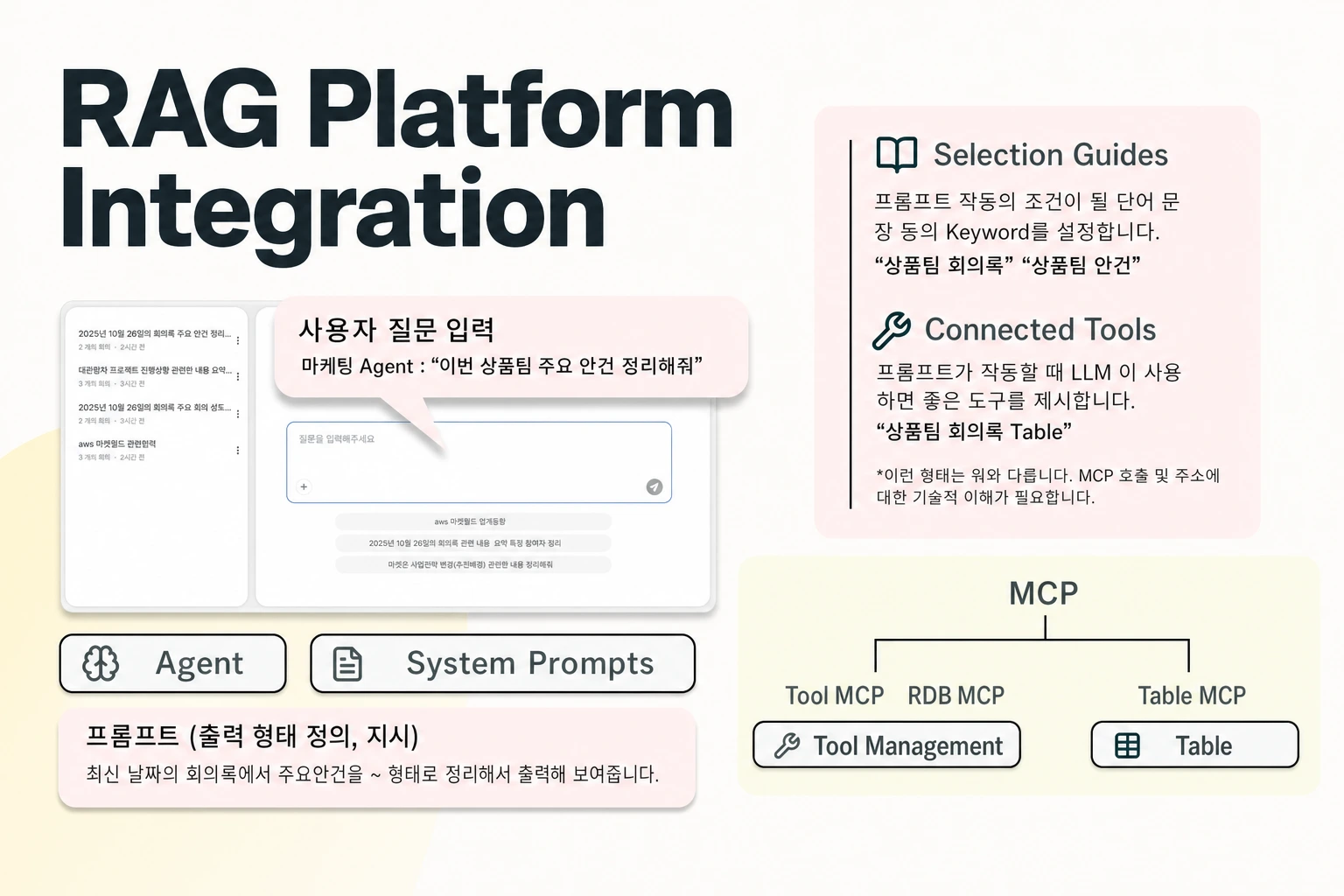
Rebuilding every connector during a platform migration happens when tool definitions are tightly coupled to a vendor-specific runtime. To prevent this lock-in, require support for the Model Context Protocol (MCP) as your shared integration layer. In Seahorse Cloud, MCP connects LLMs and external data sources such as GitHub, Slack, PostgreSQL, and Atlassian through a standard interface.
Keeping retrieval and agent execution distinct helps you scope where each integration lives. In Seahorse Cloud, Storage handles automatic chunking and embedding into vector tables, while AgentOps covers AI agent creation and deployment, tool and System Prompt connections, and access control.
Managed MCP Tool Calls in Seahorse Cloud
Evaluating how a platform executes, secures, and troubleshoots tool calls determines how much operational work your team will carry in production. Seahorse Cloud's managed agents run on its vector database and RAG, operating as an agentic AI system with MCP standard compliance, tool call support, an inference endpoint API, and usage tracking. Announced in September 2025, AgentOps in Seahorse Cloud 2.0 includes capabilities to design and operate custom AI agents using LLMs, a vector database, and MCP tool integrations. For the underlying data layer, creating a Storage instance in Seahorse Cloud generates a dedicated Table and index, then chunks, embeds, and loads uploaded files into that Table.
When registering tools in Custom create, you select a transport method based on where your MCP server runs. Standard I/O (stdio) runs a local process and communicates over stdin and stdout, which suits internally developed MCP servers, internal tools, and MCP servers distributed via npm or pip. Streamable HTTP communicates by streaming with a remote HTTP endpoint, fitting external MCP servers backed by existing server infrastructure or SaaS MCP services. Choose this transport carefully during initial setup: when updating an existing tool (Tool update), you can modify its name, access, arguments, and environment variables, but you cannot change its transport.
Day-to-day tool governance relies on transparent inspection and pre-deployment checks. A registered MCP tool's detail view displays its configuration, supported methods (tools), environment variables, invocation logs, and connected agents. Because custom MCP tool connections can fail, time out, or encounter tool-spec mismatches when an upstream MCP server repository, driver version, network, or authentication configuration changes, you need a strict validation workflow. After registering a custom tool, check its handshake and list_tools response using the Test function, and validate the tool in a development or staging tenant to identify authentication, timeout, and rate-limit failure patterns before deploying to production.
Network and access rules also require explicit verification during setup. The Seahorse agent server must be able to reach the MCP server or target API over the network, meaning your team must allow the relevant ports and domains through corporate proxies, firewalls, VPCs, or security groups. For HTTP connections, TLS certificate validity is checked with Verify SSL: true as the standard. On the user access side, if Require Authentication is enabled in Seahorse Cloud agent user settings and the selected user list is left empty, the system allows all authenticated tenant users; deleting the last selected user does not trigger a deny-all state. Seahorse Cloud features a Kubernetes-native architecture for deployment via standard resources and is available as an on-premises installation or a SaaS subscription.
Cross-Platform Setup with Seahorse Agent
Teams that interact with agents across multiple environments need consistent tool access and state retention across sessions. Seahorse Agent is an MCP-standard cross-platform AI agent that provides tool integration and cross-session context memory. While moving away from a proprietary plugin format still requires adapting your legacy integrations to MCP rather than transferring proprietary code unchanged, standardizing on an MCP-based agent keeps your new tool definitions aligned with a single protocol.
In operation, Seahorse agents answer user questions, invoke tools, and automatically execute tasks such as table searches and connections to external databases. To maintain continuity across interactions, Agent Chat uses Memory Facts as its long-term memory store. Users and operators can also control active integrations directly within the interface: Agent Chat's MCP Tools panel displays connected MCP servers and tools, expands by server, and provides tool descriptions alongside activation toggles.
FAQS
FAQ
What should we look for in an agent platform when our current integrations use a proprietary plugin format?
Look for a platform built around the Model Context Protocol (MCP) for data and tool integration; Seahorse Cloud supports MCP-standard tool calls in its managed agents, and Seahorse Agent operates as an MCP-standard cross-platform agent with tool integration and cross-session context memory.
Can we change an MCP tool's transport protocol in Seahorse Cloud after it is registered?
No, when updating an existing tool, you can change its name, access, arguments, and environment variables, but its transport cannot be changed, so you should verify whether your integration requires Standard I/O (stdio) or Streamable HTTP before registering it.
What happens if we enable authentication for a Seahorse Cloud agent without selecting specific users?
When Require Authentication is enabled in Seahorse Cloud agent user settings and the selected user list is empty, the system allows all authenticated tenant users.
Connect your MCP tools
Register custom MCP tools and manage AI agents in Seahorse Cloud.