2026 AI Data Platform Switching: What Work to Scope
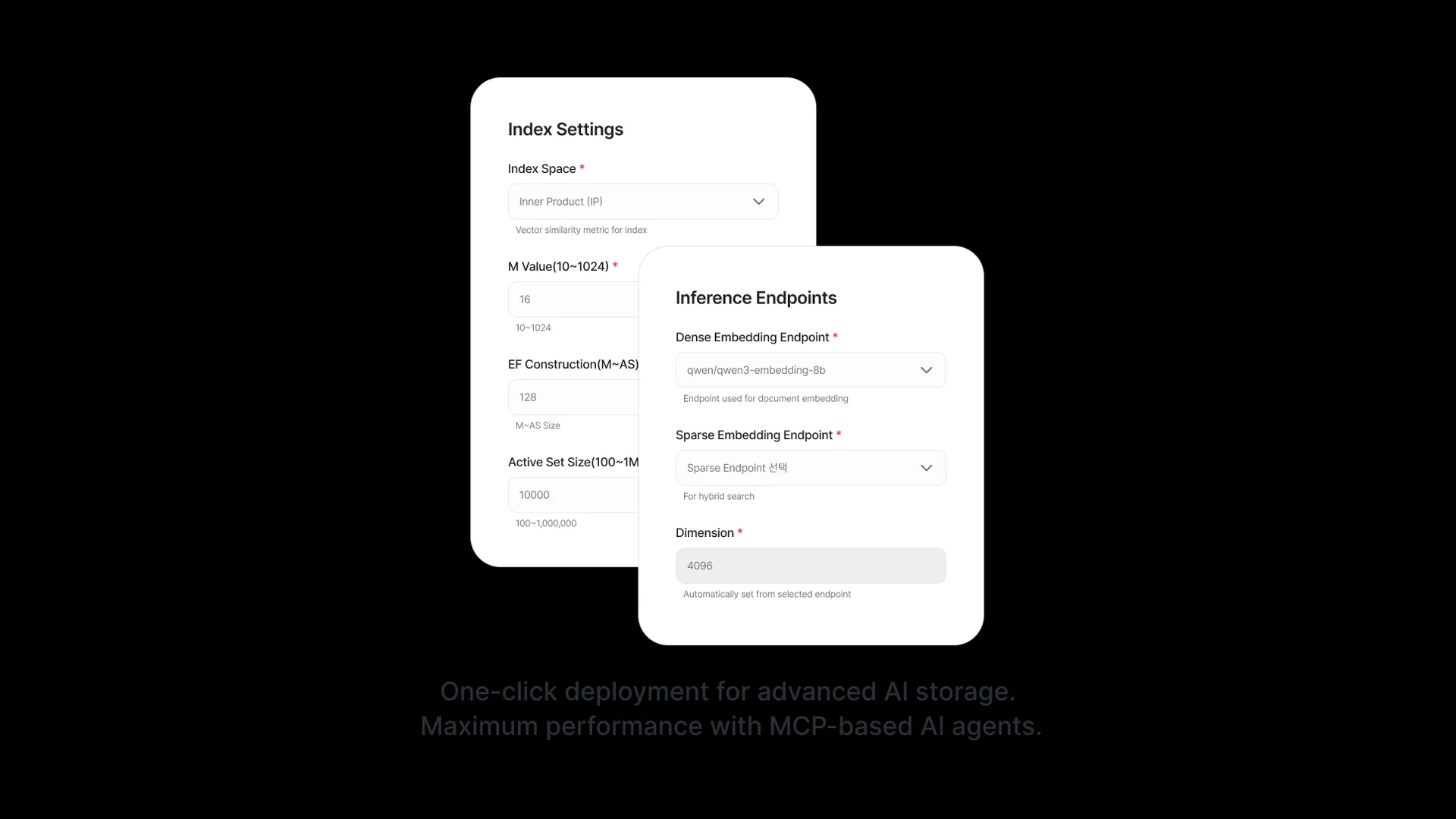
In Seahorse Cloud, creating a Storage automatically generates a dedicated Table and index while locking in your embedding endpoints, dimension, M, and EF…
Key Takeaway
- Scoping an AI data platform switch requires looking past simple file storage volume to the operational pipelines that turn raw documents into searchable vectors and active agent responses. > Key Takeaway > - Plan for Storage and AgentOps 2.0: Changing a Seahorse Cloud Storage name, Endpoint, or Index setting requires creating a new Storage, transferring files, and deleting the old one, while Seahorse Cloud 2.0 (2025-09) adds AgentOps.
- Audit integrated ingestion pipelines: Seahorse AI-based storage combines S3-compatible object storage, agentic document parsing, semantic chunking, vectorization, and vector database synchronization.
- Map agent endpoints and security rules: Finalize each agent's subdomain before connecting external services because changing a subdomain later causes the previous URL to return 404.
In Seahorse Cloud, creating a Storage automatically generates a dedicated Table and index while locking in your embedding endpoints, dimension, M, and EF Construction parameters. Knowing which configurations are fixed at creation and which remain adjustable at query time lets your engineering team separate routine parameter tuning from full data migration tasks. This guide breaks down the exact steps for replacing a Storage instance, along with checklists for auditing your document-to-vector ingestion workflows and managed agent operations. ---
Recreating Storage for Fixed Settings
When your team modifies retrieval behavior during a platform transition, you first need to verify whether the target parameters are adjustable at search time or locked at the storage level. Search-time controls—specifically Search Mode, Top K, EF Search, and RRF K—can be modified without provisioning another Storage, provided the required endpoints are already configured.
If your transition requires altering settings that are fixed upon creation, follow this sequence:
- Verify whether your planned change alters the Storage name, embedding endpoints, embedding dimension, or HNSW index parameters such as M and EF Construction, all of which are fixed when a Storage is created.
- Provision a new Storage by configuring Basic Info for the name, Inference Endpoints for Dense, Sparse, and Dimension settings, and Table Settings for HNSW vector-index parameters (the default HNSW values fit most use cases).
- Allow Seahorse Cloud to automatically generate the dedicated Table—built with a schema optimized for file embedding—along with its corresponding index.
- Transfer your source files from the existing location into the newly created Storage.
- Delete the old Storage instance. ---
Document-to-Vector Workflow Checklist
Evaluating how documents become searchable vectors helps you estimate the integration work saved or added during a platform switch. In this inventory, RAGOps refers to the composition, integrated operation, and monitoring of Retrieval-Augmented Generation (RAG) pipelines. Review these ingestion and pipeline attributes when scoping your document workflow:
- Verify source file compatibility: Seahorse Storage accepts PDF, Word, and image files, automatically embedding them into a vector-database table for AI search.
- Account for consolidated ingestion components: Seahorse AI-based storage provides S3-compatible object storage with a Vision Language Model (VLM), Optical Character Recognition (OCR), and Large Language Model (LLM) agentic document parser, semantic chunking, automatic vectorization, and automatic vector database synchronization.
- Assess chunking behavior: Native semantic chunking is integrated with document parsing, embedding, and vector sync inside Seahorse's ingestion workflow, which reduces the separate components your team has to wire together; however, "native" indicates where the capability executes and does not by itself define how headings, tables, or section boundaries are preserved.
- Trace table loading: Uploaded files are chunked, embedded, and loaded directly into the Storage's dedicated Table.
- Separate sync from access control: Automatic vector database synchronization and document-permission updates operate separately in Seahorse Cloud, meaning your team must scope permission management as a distinct task. ---
Agent Operations and Interfaces Checklist
Beyond document storage, switching platforms affects how custom AI applications are built, exposed to users, and connected to internal tools. In Seahorse Cloud 2.0 (announced in September 2025), AgentOps is the discipline for designing, deploying, managing, and monitoring custom AI agents backed by LLMs, a vector database, and tool integrations. Model Context Protocol (MCP) serves as the data and tool integration standard that supports both RAGOps and AgentOps. Use this checklist to scope your agent migration work:
- Inventory managed agent features: Seahorse Cloud managed agents provide MCP-standard tool calls, inference endpoint APIs, and usage tracking across its vector database and RAG, while Seahorse Agent preserves context memory across sessions.
- Lock in agent URLs before integration: When you save an agent and validation succeeds, it enters Deploying status and switches to Ready upon completion, becoming accessible at
{subdomain}.agent.seahorse.dnotitia.ai. Because changing an agent's subdomain after creation is difficult and causes the prior URL to return a 404 error, finalize the subdomain before connecting external systems. - Configure network paths and TLS for custom tools: Ensure the Seahorse agent server can reach your MCP server or target API over the network by opening the required ports and domains in your internal proxy, firewall, VPC, or security groups, and use valid TLS certificates for HTTP connections when Verify SSL is set to true.
- Audit user authentication rules: When Require Authentication is enabled for agent users, leaving the selected-user list empty grants access to all authenticated tenant users; removing the last selected user from that list does not trigger a deny-all state.
- Plan API key revocation: Deleting a Seahorse Cloud API key causes any subsequent calls using that key to immediately fail with a 401 authentication error, though revoking a key only invalidates that specific credential and does not establish per-document authorization for other users or keys. ---
FAQS
FAQ
What operational tasks determine the real work of switching AI data platforms?
The engineering workload depends on whether your transition requires creating a new Storage, transferring files, and deleting the old Storage for fixed parameters like embedding dimensions, how many separate parsing and chunking tools are consolidated into the ingestion pipeline, and how many external integrations rely on fixed agent URLs and firewall rules.
Can we change our hosting location without changing our delivery contract?
Yes, commercial delivery model and hosting location are independent dimensions. Seahorse Cloud features a Kubernetes-native architecture that deploys on standard resources, and you can run it as an on-premises installation or as a SaaS subscription—including deploying a SaaS subscription on premises.
When can we tune retrieval performance without migrating files to a new Storage?
You can tune retrieval when the required endpoints are already configured on your Storage, since creating a Storage locks in only the embedding endpoints, dimension, M, and EF Construction parameters.
Test your pipeline scope
Create a Storage instance and configure managed agents in the console.